Unified Dashboard:
Converting Ad-hoc Tool into Functional Product
PROJECT CONTEXT & OVERVIEW
Please open this page on your desktop / laptop to read this case study
My Role
Information Architecture, Interaction Design, Visual Design & Style-Guide creation
Team
Business Analyst team & Power BI development team
Tech Stack
Power BI (Native visuals + Custom JSON Theme)
Core Business Goal
Redesign the platform's information architecture so Sales and Finance teams could find what they needed without prior knowledge of where it was hidden.
Problem Context
What started as a quick-view tool for a single department scaled to 8–9 reports over 15 months - well past what it was originally built for.
New team members needed roughly a week of training just to navigate it
GETTING STARTED
The Project
I worked on redesigning a Power BI reporting platform used by the Sales and Finance teams at a global FMCG commercial organization. What started as a quick-view tool had grown into something much bigger - 8 to 9 reports, each with 2 to 3 levels of drill-down, built up over about 15 months.
The platform had scaled into areas it was never prepared for.
By the time I got involved, it had become genuinely hard to use without already knowing your way around it.
New team members needed about a week of training just to navigate it.
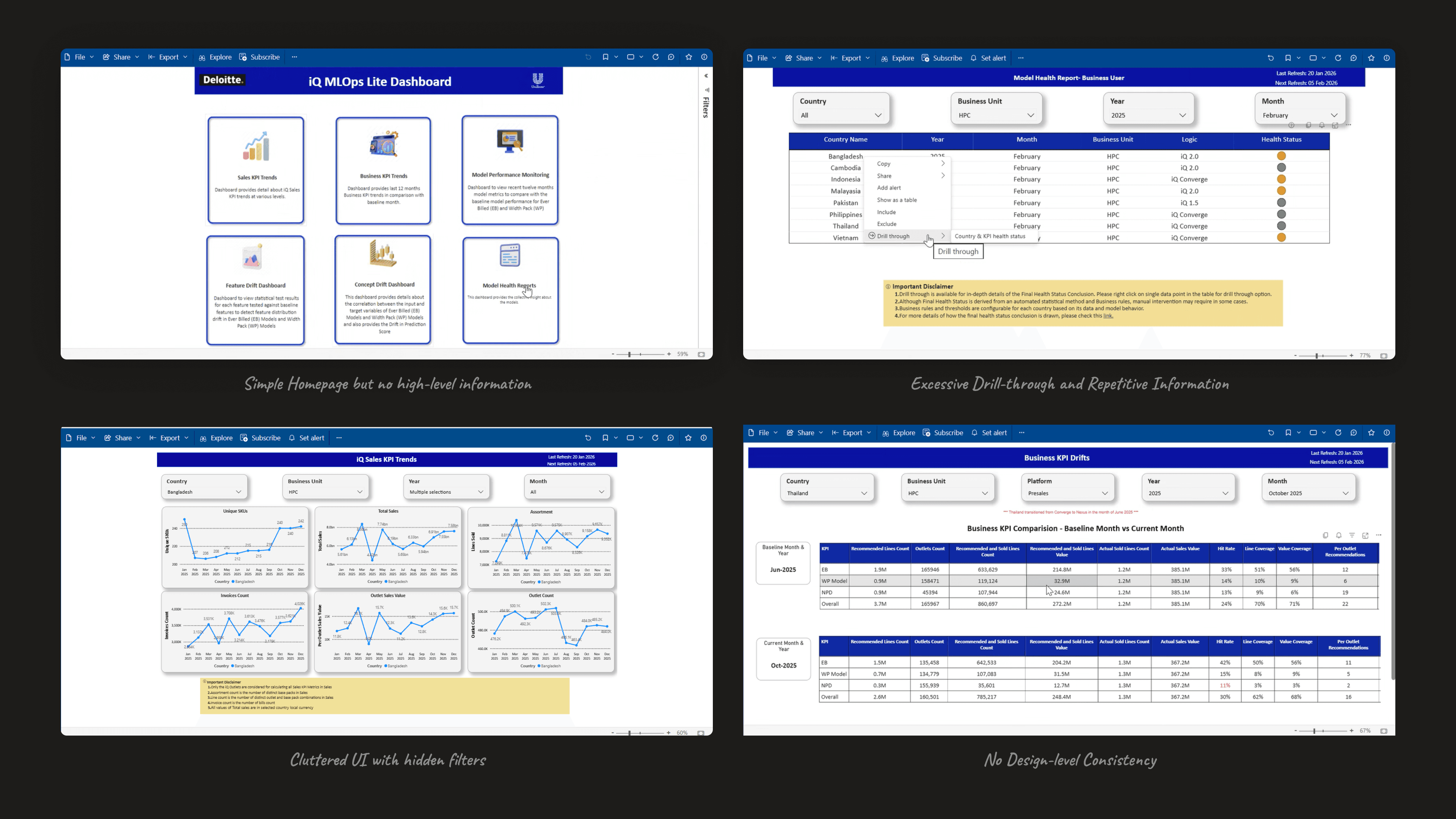
I came in with design expertise, and it still took me more than two weeks to fully understand its structure. Information was scattered behind multiple layers of drill-downs, with no explanation of what anything represented - you either already knew, or you asked someone who did.
My Role
The discovery phase - collecting user-reported issues from the platform's usage and turning them into a requirements document; had already been done by the consulting team before I joined.
That was handed to me as a starting point.
From there, the information architecture, interaction model, visual system, KPI presentation system, and reusable design system were all mine to design and build.
PROBLEM & UNDERSTANDING
The Problem, Up Close
The obvious move here would’ve been to patch things - add a few filters, refresh the visuals, extend the existing drill-down pattern.
But that had already been tried, and it’s exactly what created the mess I inherited.
Two things stood out.
Tables across the platform were often nearly empty - a single line of data; with more detail hidden behind a drill-down rather than the table itself being restructured.
And a disclaimer that had clearly been written for the platform’s very first report was still sitting at the bottom of every other report, in a position that no longer made sense for the data actually being shown.

Both were signs of the same thing - this platform’s structure reflected the order reports were built in, not what users actually needed from it. Patching wasn’t going to fix that.
The foundation itself needed to change.
Rebuilding the Structure
I restructured the reports around how metrics actually relate to each other in use, not around which report came first.
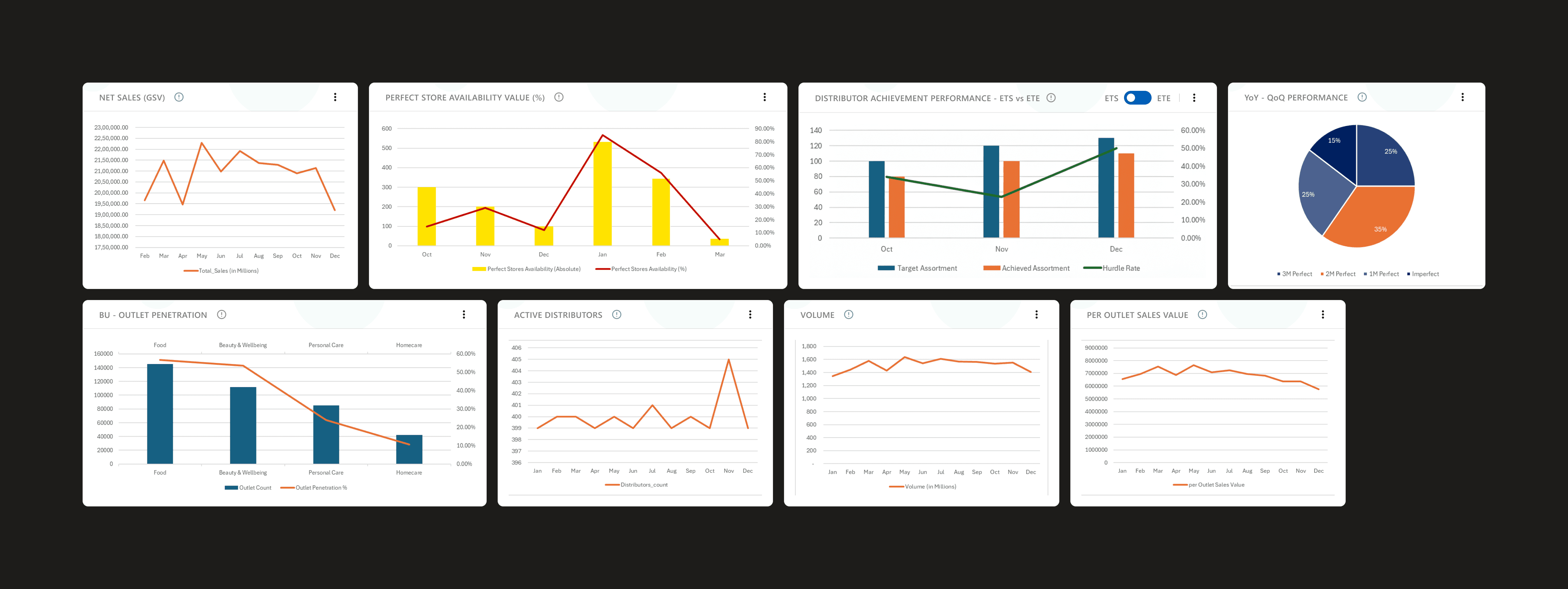
One section; Business Performance, now groups KPIs like Net Sales, Invoice, Volume, Assortments, and Active Stores together, broken down by market and year, with country moved out of the table entirely and into a filter.
This structure came out of close collaboration with our BA team, working from general direction, and was signed off by management.

I replaced the old three-level drill-down with a simpler two-tier structure: a persistent quick-glance metrics section that stays visible no matter what filter or tab you’re on, and two tabs below it — Current Performance and Growth Tracker — that load pre-filtered, immediately visible graphs. No extra clicks, no prior knowledge required to find what you’re looking for. I also defined sensible filter defaults — current year, most-frequently-used market — which the backend team implemented.
The old page-level disclaimer was moved to sit contextually next to the specific visual it applied to, so it stays accurate as report content changes.

Alongside this, I put together a presentation system for KPIs going forward — every new KPI entering these reports gets a title, a short subtext, and an info icon where it’s needed, rather than showing up as a bare, unexplained number. It’s meant to slow down what gets added and keep it deliberate, rather than letting ad hoc metrics pile up the way they had before.
A Consistent Design System
Problem
There was no shared visual system on this platform before - every report had been styled individually, with no consistency in colour, typography, or spacing.
Approach
I defined a design token system covering colour, typography, spacing, and content structure, which our development team then implemented as a reusable Power BI theme.
Challenge
The client’s brand guidelines limited the colour palette we could use, but good data visualization needs visually distinct series - especially across multiple line graphs. I solved this by varying hue and opacity within the brand palette, so series stayed distinguishable without ever going off-brand.
Solution
This system ended up being adopted across the entire Power BI reporting suite, not just the section I was redesigning — which was genuinely satisfying to see happen.
The conflicts
Working Through Disagreement
Two decisions in particular led to real back-and-forth with stakeholders.
Challenges
What Stakeholders pushed for
What I pushed for
Resolution
Navigation
Stakeholders wanted to keep the left-side menu.
Reason: It is familiar to the team & the stakeholders so it will be easy for them to use the new reports.
I pushed for a persistent top menu instead.
Reason: It freed up horizontal space for data-heavy reports relied on, while providing quick single-click scroll to access any sections.
Shipped as designed.
No left-side menu retained
Disclaimer Placement
Stakeholders wanted to keep it as one block at the end of the page.
Reason: It is technically easier to add new disclaimers without any additional thinking required.
I argued that placing disclaimers next to the specific visual.
Reason: It would help users actually understand which constraints applied to which data.
Compromise; disclaimers live contextually next to visuals, with a page-level element kept as a fallback

Progressive Disclosure
Discovery
Three levels of drill-down stood between the user and the data they needed; nothing was visible without already knowing where to look.
Solution
Replaced with a two-tier structure built on progressive disclosure:
Quick Glance: A persistent quick-glance metrics section, always visible regardless of filter or tab,
Detailed Section: Dictated by fitlers, with immediately visible graphs and related tables.
No extra clicks, no prior knowledge required to find what you're looking for.
Qualitative outcomes & results
Results
No Formal Post-Launch Data
My work on this project ended at delivery, before any usage data - adoption, time-to-information, reduction in support questions could be tracked.
There's no post-launch metric I can point to here.
Stakeholder Reception
Reception from stakeholders at handoff was genuinely positive.
Design System Adoption
The clearest evidence I have of real impact is something I saw firsthand: the design system I built for this one section ended up being adopted across the entire Power BI reporting suite — a sign that what we built here held up well beyond its original scope.
Conclusion & Reflection
Reflecting back
The real lesson from this project was that the platform's problems weren't cosmetic - they were structural, built up over time as the tool outgrew what it was designed for.
Patching it further would have just added to that. Rebuilding the information architecture around how people actually used the data, rather than how the reports happened to be built, was the only way to actually fix it.
Please open this page on your desktop / laptop to read this case study